
Cars: Merge and Defend
Gimica GmbHArcade
4.3860.00 Reviews
- Version
- 1.5.0
- Installs
- 1.00M
- Age Rating
- Everyone 10+
Screenshots
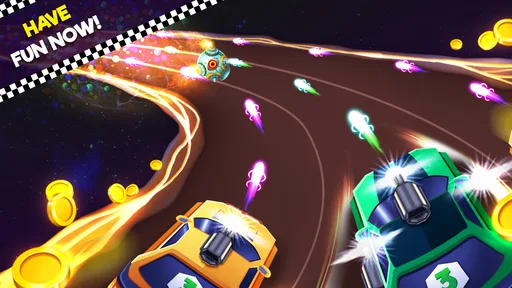

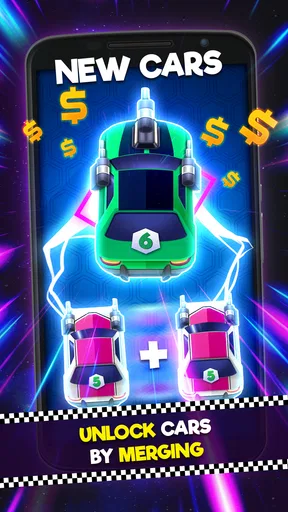

Our Review of Cars: Merge and Defend
 Analysis by Appyee
I approached Cars: Merge and Defend expecting a quick arcade game built around vehicles and short bursts of attention. That is the right general mindset, but the first thing I noticed is that the experience depends heavily on understanding what the game is asking me to do at any given moment. Its simple presentation makes it approachable, while the defensive angle gives each session a little more purpose than simply driving around.
Developed by Gimica GmbH, this free arcade game is aimed at players aged 10 and over. It has reached more than a million installs and holds a 4.3 average from roughly 21 thousand ratings, which suggests that the basic idea connects with a broad audience. My impression is that it works best as a casual game for short sessions rather than as a deep driving simulator or a long-form strategy title.
Getting comfortable with the game before the action speeds up
The biggest early obstacle is not the controls themselves; it is learning the rhythm. A player can see cars and immediately assume this is a conventional racing game, but the merge-and-defend concept points toward a more deliberate arcade loop. I found it useful to spend the first few attempts watching how the game responds before trying to move quickly. That small pause helps reveal whether a mistake came from poor timing, an overlooked prompt, or simply choosing an action too early.
This matters because casual games often look self-explanatory while quietly expecting the player to recognize patterns. In this case, I would not judge the experience after one rushed attempt. The opening moments are better treated as a tutorial through play: observe the screen, identify the immediate objective, and then repeat the action with less hesitation. That approach also makes it easier to tell whether the game feels enjoyable to you or whether its pace is too repetitive.
Another point of friction is the difference between wanting a relaxing car game and getting an arcade challenge. The cars provide the visual identity, but the appeal comes from reacting to the situation rather than from realistic handling. If you are looking for detailed vehicle physics, open roads, or a large collection of driving activities, this will feel limited. If you like compact challenges where a small decision can change the result, the format is more suitable.
What I check before blaming the controls
When something feels unresponsive, I first separate a genuine input problem from a timing mistake. In a fast arcade sequence, tapping immediately after an event may be too late, while tapping before the game is ready may do nothing. I slow down for one round and use deliberate inputs. If the same action works consistently when I wait for the visual cue, the issue is probably my timing rather than the device.
I also make sure my finger is not covering the part of the screen I need to read. That sounds obvious, but vehicle games with compact layouts can make a thumb obscure a warning or an upcoming action. Holding the phone slightly farther away and using a lighter touch helped me read the scene without turning every move into a guess.
Because the game is free, it is also worth remembering that free arcade titles commonly use optional purchases as part of their progression or convenience model. Cars: Merge and Defend lists in-app purchases ranging from $0.99 to $9.99 per item. I would decide in advance whether I am comfortable spending anything, then keep that boundary clear. The best way to enjoy a short-session game is not to let a failed attempt pressure me into buying a shortcut.
A sensible setup routine on Android
The listed minimum operating-system requirement is Android 7.0, so I would begin by checking that the phone meets that baseline and has enough free space for a normal installation and update process. I would also close demanding apps before playing, especially on an older device. This is not a guarantee of perfect performance, but it removes common sources of stutter and accidental background interruptions.
After installing, I would launch the game once while connected to a stable network, allow it to finish any initial preparation, and then play a short test session. That gives me a clean reference point. If the game behaves normally at first and later becomes unstable, I can compare the two situations instead of guessing whether the installation itself was incomplete.
The current version is 1.5.0, so checking that the installed version matches the current store version is a practical first step when troubleshooting. I would avoid repeatedly uninstalling and reinstalling before trying simpler checks. A restart, closing other apps, and confirming that the operating system is up to date are less disruptive and often reveal whether the problem is temporary.
On iOS, the same general principle applies even though the listed minimum-system detail here is for Android. Keep the device updated, leave room for the game and its updates, and test it after a full restart if the first launch is unusually slow. I would not assume that an issue on one phone automatically means the game is broken everywhere; device age, available memory, and system load can change the result considerably.
Recovering after a poor run
My preferred recovery method is to change only one thing at a time. If I failed because I moved too early, I keep the same general approach but delay that input. If the screen became difficult to read, I change my grip or brightness rather than altering several settings at once. This turns a frustrating loss into a useful test and prevents me from losing track of what actually helped.
When a session seems to stop responding, I would leave the game normally if possible, reopen it, and try again before taking more drastic action. If the issue continues, restarting the phone is the next reasonable step. I would also check whether another app is consuming resources or whether the device is running unusually hot. A game can appear to be at fault when the wider system is already under strain.
I am cautious about clearing app data or reinstalling. Those actions can remove local progress or reset preferences, depending on how the game handles saved information. I would use them only after simpler recovery steps and only when I am prepared for the possibility that a local session may not return. That is especially important for a casual game, because the convenience of starting over may not compensate for losing progress I wanted to keep.
If a purchase does not appear immediately, I would avoid buying again straight away. First I would confirm that the transaction completed, reopen the game, and check the relevant screen once more. Repeated taps can create confusion and potentially turn a delay into duplicate charges. The safer habit is to wait, verify, and use the platform’s normal purchase-support process if the item still does not appear.
How I use it in everyday life
Cars: Merge and Defend fits naturally into small gaps in the day. I can imagine playing it while waiting for a friend, taking a short break from work, or sitting on public transport for a few stops. The important distinction is that I would not begin a session when I need to be attentive elsewhere. Even a compact arcade round can demand quick decisions, and playing while walking or driving would be an obvious safety mistake.
For a short break, I use a simple limit: play a few attempts, then stop and decide whether I am still enjoying the decisions or merely repeating them. This helps prevent the familiar casual-game trap of continuing after the fun has faded. The game is strongest when I want a focused distraction, not when I expect a large world to explore for an entire evening.
It can also work as a low-pressure introduction to arcade games for someone who does not want complicated controls. The vehicle theme is immediately understandable, and the merge-and-defend idea gives the player a clear reason to pay attention. However, I would start with someone who enjoys retrying short challenges. A player who dislikes repetition or expects every attempt to unlock a major new experience may lose interest quickly.
Where it sits among other car games
Compared with traditional racing games, this is a lighter and more focused option. A racing game usually emphasizes lap times, steering, tracks, and the feeling of controlling a vehicle through space. Cars: Merge and Defend is better judged by how clearly it communicates its next action and how satisfying its quick decisions feel. That makes it easier to pick up, but it also means there is less room for players who want simulation or competitive driving technique.
Compared with idle or merge games, the defensive framing gives the cars a more active role. I am not simply arranging objects at my own pace; I need to pay attention to the immediate situation. The trade-off is that this can feel less relaxing than a slow merge title. Players who enjoy planning without pressure may prefer a calmer alternative, while players who want their merge decisions to matter immediately may find this more engaging.
It also differs from large, content-heavy arcade games. There is value in being able to open a game without committing to a long story or complicated system, but the compact design can become repetitive if the central loop does not hold your attention. I would choose it for accessibility and quick play, not for a huge sense of discovery.
Small habits that make the experience smoother
My first practical tip is to learn the visual language before trying to optimize anything. I watch for the moment when the game clearly signals that an action is available, then I repeat that timing. This is more useful than tapping rapidly, because rapid tapping can hide whether I am making a strategic mistake or simply missing the intended cue.
My second tip is to keep the phone stable. Resting it lightly in both hands gives me more control than holding it in one hand while using a thumb at an awkward angle. That is particularly helpful during a difficult sequence, when a small accidental movement can make a deliberate input look like a random one.
My third tip is to treat failed attempts as information. I note whether the problem was poor timing, unclear reading, or an unexpected change in the situation. If the same failure happens repeatedly, I change my approach rather than just playing faster. This mindset makes the arcade loop feel more skill-based and less like a series of arbitrary losses.
A fourth useful habit is to test the game under normal conditions before forming a strong opinion. I would try it with notifications minimized, other apps closed, and the screen comfortable to read. If it feels good only under ideal conditions, that is still useful information: the game may be best on a newer or less busy device. If it remains clear and responsive during an ordinary break, it is more likely to fit daily use.
When the problem is probably outside the game
Not every crash, delay, or visual hiccup points to Cars: Merge and Defend itself. Low storage, aggressive battery-saving settings, an overloaded device, unstable connectivity during startup, or an operating-system issue can all affect a game. I would compare the behavior with another demanding app. If several apps are slow, the phone is the more likely starting point for troubleshooting.
Heat is another useful clue. If the device becomes unusually warm and performance drops across multiple apps, I would stop playing and let it cool rather than continuing to force the session. A game is not worth risking discomfort or damaging normal device performance. Likewise, if the screen has touch problems elsewhere, it is unfair to judge the game’s input handling from that phone alone.
For a persistent issue, I would record the exact moment it happens, the device and operating-system details, and whether restarting changes anything. A clear description is more useful than saying only that the game is broken. I would then use the official support route associated with the app platform or developer, Gimica GmbH, rather than relying on random fixes that might erase local progress.
Who should try it and who should skip it
I would recommend this game to someone who wants a free arcade experience with cars, quick decisions, and an easy entry point. It is especially suitable for short breaks and for players who enjoy repeating a challenge until their timing improves. The age rating of Everyone 10+ also makes its intended audience broader than games built around mature themes, although parents should still remember that optional purchases are available.
I would be more cautious recommending it to a player who wants realistic driving, extensive customization, a long campaign, or a quiet idle experience. Those expectations point toward other categories. I would also skip it if I knew I was impatient with retries, because the central appeal depends on learning through repeated attempts rather than moving through a story at a steady pace.
The game’s popularity gives it a useful level of credibility, but popularity does not make the design universal. A 4.3 average across around 21 thousand ratings is encouraging, and more than a million installs show that it has found an audience. I still think personal tolerance for repetition and optional spending matters more than those figures when deciding whether it belongs on your phone.
My practical verdict
Cars: Merge and Defend is a straightforward free arcade game that earns its place through accessibility rather than complexity. I like it most when I use it as a focused, short-session challenge and pay attention to timing instead of treating it like a conventional racer. Its car theme is inviting, while the defensive structure gives the quick actions a clear purpose.
The main friction comes from knowing what the game expects in each moment, handling the repetition, and separating genuine technical issues from rushed inputs or a busy device. A careful setup, a stable grip, and a one-change-at-a-time troubleshooting approach make the experience easier to judge fairly. I would also keep the optional purchase range of $0.99 to $9.99 per item in mind before playing regularly.
My final recommendation is positive but specific: try it if you want a compact arcade game about cars and do not need simulation-level driving or a massive progression system. Give it a few thoughtful attempts rather than judging the first one, and stop if the repeated loop feels like work. For the right player, the strongest part is the immediate decision-making, not the promise of a full racing world.
Verdict
Strengths of Cars: Merge and Defend
- Simple merge mechanics are easy to learn and play one-handed.
- Short battles fit well into quick gaming sessions.
- Car upgrades provide a clear sense of progression.
- Colorful visuals make the vehicles easy to distinguish.
- Playable without demanding advanced gaming skills.
Limitations of Cars: Merge and Defend
- Progress can become repetitive after extended play.
- Higher upgrades may require considerable grinding.
- Frequent ads can interrupt the gameplay flow.
- Limited strategic depth may disappoint experienced players.
- Performance may vary on older or less powerful devices.
Other Releases by Gimica GmbH
View All


Similar Picks in This Category
View All
Subway Surfers
SYBO Games4.6

Stickman Party 234 MiniGames
PlayMax Game Studio4.6

Subway Princess Runner
Ivy4.4

Temple Run
Imangi Studios4.2

Zombie Tsunami
Mobigame SAS4.6

Stack Ball - Crash Platforms
CASUAL AZUR GAMES4.5
Frequently Asked Questions
What is Cars: Merge and Defend, and how does the gameplay work?
Cars: Merge and Defend is a casual strategy game centered on combining vehicles and using them to stop incoming enemies. You generally merge matching cars to create stronger units, arrange or deploy them strategically, and progress through increasingly difficult stages. The gameplay is easy to understand, but later levels require better timing, vehicle choices, and resource management rather than simply merging as quickly as possible.
Is Cars: Merge and Defend free to download and play?
The game can be downloaded and played without an upfront purchase, but it may include optional in-app purchases. These purchases can provide currency, upgrades, boosters, or other advantages that help shorten progression time. Players who prefer not to spend money can still enjoy the core experience, although they may need to tolerate more waiting, repeat levels, or advertisements while collecting enough resources to improve their vehicles.
Does Cars: Merge and Defend require an internet connection?
Some parts of Cars: Merge and Defend may work without a constant connection, especially the basic merging and level gameplay. However, internet access can be required for advertisements, cloud-related features, updates, events, purchases, or synchronization. Because offline availability may vary by version and device, it is best to launch the game once while connected before relying on it during travel or in areas with limited mobile service.
Are there advertisements in Cars: Merge and Defend?
Cars: Merge and Defend may display advertisements, commonly between stages or after a failed attempt, and it may also offer optional rewarded videos in exchange for extra coins, boosts, or another gameplay benefit. The advertising frequency can differ depending on progression and platform. If you dislike interruptions, check whether the game provides an ad-removal purchase, while remembering that optional ads may be useful for free resource rewards.
Is Cars: Merge and Defend suitable for children and does it need much storage?
Cars: Merge and Defend is designed around simple controls and colorful vehicle-based action, making it approachable for younger players and casual gamers. Nevertheless, parents should review the store rating, advertising, and in-app purchase settings before allowing children to play. The initial download is usually modest compared with larger 3D games, but updates and temporary files can increase storage use over time, so keeping free space available is recommended.
Play our best games!


